
System Metric
1 System Metrics
System metrics menu is newly added to Pinpoint in v2.5.0. Pinpoint uses telegraf agent to collect system metrics data to Pinpoint Collector in which the data are saved in Pinot. Saved system metrics data are accessible via Pinpoint web.

Pinot is a real-time distributed OLAP datastore. For further information please refer to their official documents.
2 Architecture
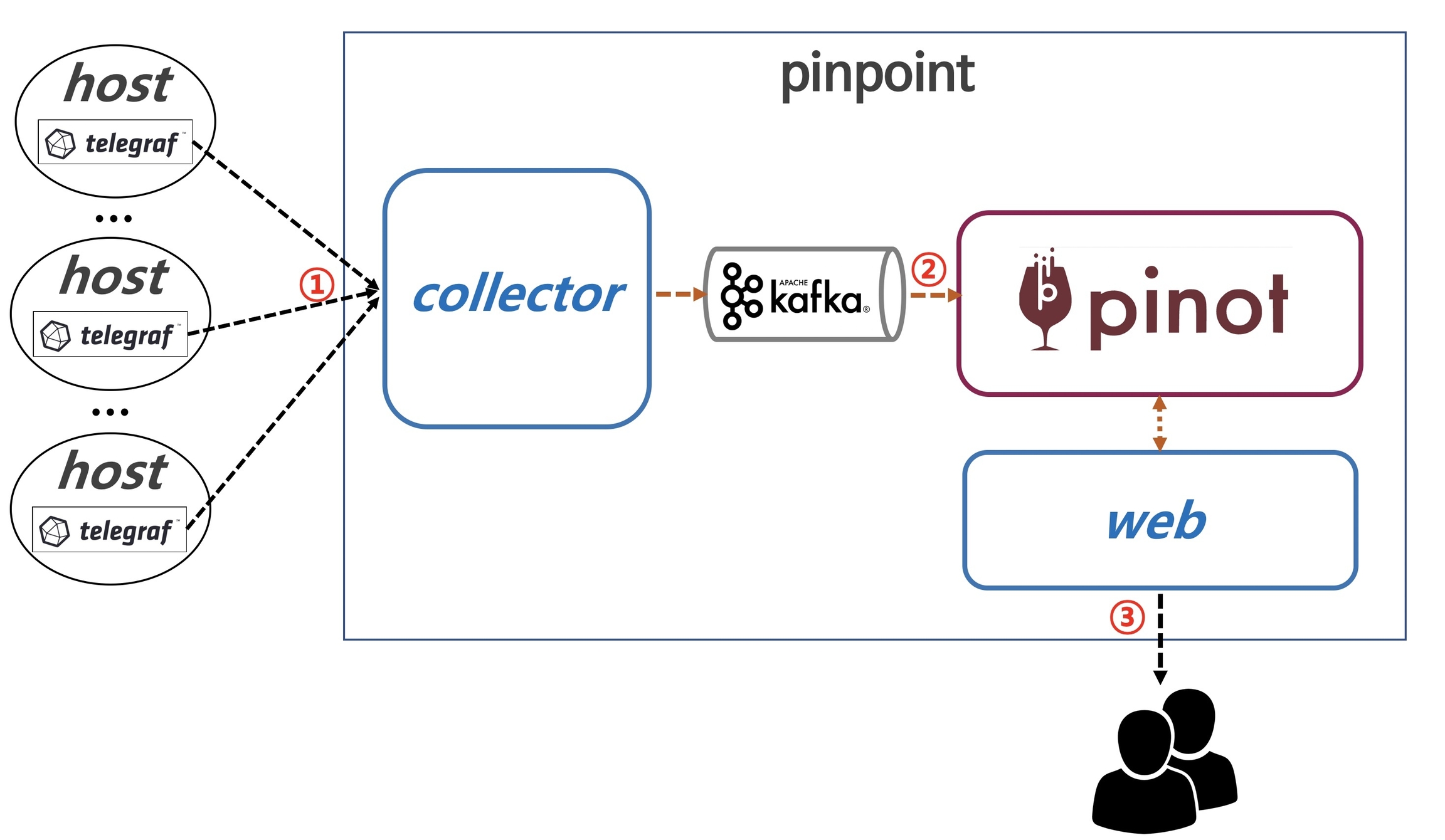
Telegraf agent sends system metrics data to Pinpoint collector.
Pinpoint collector saves data to Pinot through Kafka.
Kafka is necessary to stream data to Pinot.
Pinpoint web accesses Pinot to display collected metrics data.
3 Installation and Configuration
3.1 Install Kafka
Kafka enables real-time streaming of system metrics data from Pinpoint collector to Pinot.
3.1.A Kafka Installation Guide
Please refer to this document to get Kafka and start the Kafka environment.
3.1.B Create Kafka Topics for Pinpoint System Metrics
Create 3 topics with the names below:
system-metric-data-typesystem-metric-tagsystem-metric-double
3.2 Install Pinot
This section describes how to install Pinot which is used in Pinpoint to save system metrics data.
3.2.A Install and Run Pinot
Install Pinot according to Pinot Getting Started guide
Above guide gives you the way to run Pinot locally, in Docker, and in Kubernetes.
3.2.B Create Pinot Tables
Pinot table schemas for Pinpoint system metrics is provided in our github repository.
Please refer to Pinot documents to create necessary tables in your Pinot cluster.
Total 3 tables should be created.
systemMetricDataType: this table saves type informations on collected data.
systemMetricTag: this table saves metadata (i.e., host, tags) for collected data.
systemMetricDouble: this table saves metric data in double. In order to use the hybrid table feature, create both REALTIME and OFFLINE tables.
3.3 Configure and Run Pinpoint Collector with System Metrics
There are additional configurations for Pinpoint collector to collect the metrics data from Telegraf agents.
3.3.A Pinpoint Collector Settings for System Metrics
1) In order to communicate with Pinot, you need to modify the configuration files in the profiles directory according to your profile.
Modify pinot-jdbc.properties configuration: Set the address of the Pinot installed in 3.1 as follows:
2) In order to communicate with Kafka, you need to modify the configuration files in the profiles directory according to your profile.
Modify kafka-producer-factory.properties configuration: Set the address of your Kafka instance:
3.3.B Run Pinpoint Collector with System Metrics
After successfully building Pinpoint project, run pinpoint-collector-starter-boot-XXXX.jar file created under pinpoint/metric-module/collector-starter/target/deploy.
pinpoint-collector-starter-boot-XXXX.jarincludes system metrics on top of original pinpoint-collector.In order to enable metric functions, you need to add
--pinpoint.collector.type=METRICor--pinpoint.collector.type=ALLarguments when starting the application.METRIC: only enables collecting the system metrics.
ALL: enables both pinpoint collector and system metrics collection.
3.4 Configure and Run Pinpoint Web with System Metrics
There are additional configurations for Pinpoint web to display the system metrics data stored in Pinot.
3.4.A Pinpoint Web Settings for System Metrics
In order to communicate with Pinot, you need to modify the configuration files in the [profiles]((https://github.com/pinpoint-apm/pinpoint/tree/master/pinot/pinot-config/src/main/resources/pinot/profiles) directory according to your profile.
Update the address of the Pinot installed in 3.1 in the jdbc-pinot.properties configuration file:
2) To enable the system metric feature in the web interface, modify the pinpoint-web-metric.properties file:
3.4.B Run Pinpoint Web with System Metrics
After successfully building Pinpoint project, run pinpoint-web-starter-boot-XXXX.jar file created under pinpoint/metric-module/web-starter/target/deploy.
3.5 Additional Information
Pinpoint web and collector binaries with system metrics is located under different directories from those of the original Pinpoint web and collector.
original collector: pinpoint/collector/deploy -> collector with system metrics: pinpoint/metric-module/collector-starter/target/deploy
original web: pinpoint/web/deploy -> web with system metrics: pinpoint/metric-module/web-starter/target/deploy
3.6 Install and Configure Talegraf Agent
Telegraf collects below metrics information on the host machine:
cpu
disk usage
disk usage (percent)
inode usage
memory usage
memory usage(percent)
swap
system load
nginx
apache
Install Telegraf according to this installation guide.
Add below configuration to
telegraf.conffile to send collected metrics to Pinpoint collector via http.url: substitute{PINPOINT_COLLECTOR_IP}to your Pinpoint collector address so that telegraf can send collected metrics to Pinpoint collectorhostGroupName: this value will be used as the key in Pinpoint web when querying the metrics details. It is recommended to use your applicationName already used in Pinpoint.
4 View Collected System Metrics Data
Click
Infrastructureon the side bar menu in Pinpoint web.Search for the hostGroupName you have configured for Telegraf agents as decribed in 3.4.
A list of hosts will be displayed on the left, and you can view the system metrics data by clicking each of them.

5 Notes
Other metrics and statistics data will be stored in Pinot to enhance Pinpoint experience in near future.
Currently this system metrics versions are in beta. It will be officially released when when we can make sure that everything works as we intended.
If you have been using the system metric feature in version 2.5.0 or lower and are upgrading, please refer to guide for instructions.
1 system metrics 기능이란?
system metrics 기능은 v2.5.0에 핀포인트에 새로 추가되었다. telegraf agent 를 사용하여 system metric 데이터를 collector에 전달하고 pinot에 데이터를 저장한다. pinpoint web에서 저장된 system metric 데이터를 확인할 수 있다.
pinot는 실시간 분산 OLAP 데이터 저장소이다. 자세한 사항은 pinot 사이트를 참고하도록 하자.
2 구조
① telgegraf agent에서 system metric 데이터를 collector에 전달한다.
② collector는 kafka에 데이터를 전송하여 pinot에 데이터를 저장한다.
참고로 pinot는 stream 데이터 전송을 위해서 kafka를 반드시 필요로 한다.
③ web은 pinot에서 데이터를 조회하여 화면으로 데이터를 보여준다.
3 설치/설정 방법
3.1 kafka 설치 및 실행
실시간으로 collector에서 데이터를 전달받아 pinot에 저장하기 위해서 kafka를 설치해야 한다.
3.1.A. kafka 설치
설치 가이드 링크를 보고 kafka를 다운 받아 실행하자.
3.1.B. topic 생성
아래 3개 topic을 생성하자. -
system-metric-data-type,system-metric-tag,system-metric-double
3.2 pinot 설치 및 실행
시스템 메트릭 데이터를 저장하는 pinot를 설치하는 법을 안내한다.
3.2.A. pinot 설치 및 실행
pinot 사이트에서 설치 방법 가이드를 참고하여 pinot를 설치한다.
다양한 환경(local, docker, Kubernetes)에서 pinot 실행 환경을 구성할 수 있으니 위 가이드를 참고하자.
3.2.B. 테이블 스키마 및 생성
테이블 생성 스키마 파일에 테이블 정보가 있다.
테이블 생성 방법은 pinot가이드를 참고하여 pinot 실행 환경 맞게 테이블을 생성하면 된다.
생성하는 테이블은 총 3개이다.
systemMetricDataType : 수집되는 데이터의 type 정보를 저장하는 테이블이다.
systemMetricTag : 수집되는 데이터의 metadata(host 정보, 데이터의 tag 정보)를 저장하는 테이블이다.
systemMetricDouble : double 데이터를 저장하는 테이블이다. hybrid table 기능 사용을 위해서 REALTIME, OFFLINE 테이블 둘다 생성하자.
3.3 collector 설정 및 실행
telegraf agent로 부터 전송된 데이터를 수집하기 위해서 collector에 설정을 추가한다.
3.3.A. collector 설정
1) pinot와 통신을 위해서 설정파일들을 profile에 맞게 수정해야 한다.
pinot-jdbc.properties 설정 : 3.1에서 설치한 pinot의 주소를 설정한다.
2) kafka와 통신을 위해서 설정파일들을 profile에 맞게 수정해야 한다.
kafka-producer-factory.properties 설정 : kafka 의 주소를 설정한다.
3.3.B. collector 실행 방법
빌드 후 pinpoint/metric-module/collector-starter/target/deploy에 생성된 pinpoint-collector-starter-boot-XXXX.jar을 실행하면 된다.
pinpoint-collector-starter-boot-XXXX.jar은 pinpoint-collector 기능과 system metric 수집기능이 합해진 패키지이다.metric 기능을 활성화 하기 위해서 실행시
--pinpoint.collector.type=METRIC나--pinpoint.collector.type=ALL옵션을 추가해야한다.METRIC : system metric 수집기능만 동작된다.
ALL : pinpoint collector 기능과 system metric 수집기능이 동시에 동작된다.
3.4 web 설정 및 실행
pinot에 저장된 시스템 메트릭 데이터를 보여주기 위해서 web 설정을 수정한다.
3.4.A. web 설정
1) pinot와 통신을 위해서 설정파일들을 profile에 맞게 수정해야 한다.
jdbc-pinot.properties 설정 : 3.1에서 설치한 pinot의 주소를 설정한다.
2)
system metric 기능을 web에서 활성화하기 위해서 pinpoint-web-metric.properties 파일을 수정한다.
3.4.B. web 실행 방법
빌드 후 pinpoint/metric-module/web-starter/target/deploy에 생성된 pinpoint-web-starter-boot-XXXX.jar을 실행하면 된다.
pinpoint-web-starter-boot-XXXX.jar은 pinpoint web 기능과 metric 데이터 확인 기능이 합해진 패키지이다.
3.5 참고
참고로 web, collector의 실행파일이 과거 버전과 다르게 다른곳에 존재한다.
기존의 web, collector 실행파일 경로와 다르게 system metric기능이 포함된 collector, web은 실행 파일 경로는 다음과 같다.
collector : pinpoint/collector/deploy -> pinpoint/metric-module/collector-starter/target/deploy
web : pinpoint/web/deploy -> pinpoint/metric-module/web-starter/target/deploy
3.6 telegraf agent 설치 및 설정
telegraf agent를 통해 수집된 시스템 메트릭은 다음과 같다.
cpu
disk usage
disk usage(percent)
inode usage
memory usage
memory usage(percent)
swap
system load
nginx
apache
시스템 메트릭 데이터를 수집하는 telegraf agent를 설치하자.
telegraf agent가 http 프로토콜로 collector에 데이터를 전달할 수 있도록 설정파일을 수정 해야한다.
telegraf.conf 설정 방법
http 프로토콜로 데이터를 전달수 있도록 output http plugin 아래 설정을 추가한다.
url: {PINPOINT_COLLECTOR_IP} 자리에 데이터를 수집하는 collector의 주소를 설정한다.outputs.http.headers은 서버 그룹의 key와 Content-Type을 설정한다.hostGroupName: {applicationName}에 설정한 값을 key로 pinpoint-web에서 데이터를 조회할 수 있다. 핀포인트를 이미 사용 중이라면 application을 추적할 때 agent 설정 값으로 사용했던 applicationName을 사용하는 것을 추천한다.
4 데이터 조회
pinpoint-web에서 왼쪽
Infrastructure메뉴를 선택하여 system metric 화면으로 이동한다.상단의 select box에서 telegraf.conf 파일에 설정한 hostGroupName 값을 찾아서 선택한다.
아래와 같이 왼쪽에 호스트 목록이 나오고, 호스트를 선택해서 system metric 데이터를 확인할 수 있다.
5 기타
pinot에는 system metric 뿐만아니라 pinpoint의 다양한 메트릭 데이터와 통계 데이터를 저장할 예정이다. 즉 pinot는 다양한 데이터를 저장하는 목적으로 사용될 것이다.
system metric의 경우 당분간은 beta 기능으로 제공할것이고 안정적으로 기능이 운영되는 경험이 쌓이면 공식적으로 기능을 제공할 것이다.
2.5.0 이하 버전에서 system metric 기능을 사용하다가 버전을 업그레이드 하는 경우 guide 설명을 참고하자.
Was this helpful?